
NIST CSF 2.0 Small Business Operating Record Reference
A practical documentation reference for turning the NIST Cybersecurity Framework 2.0 into a lightweight operating record small businesses can maintain.
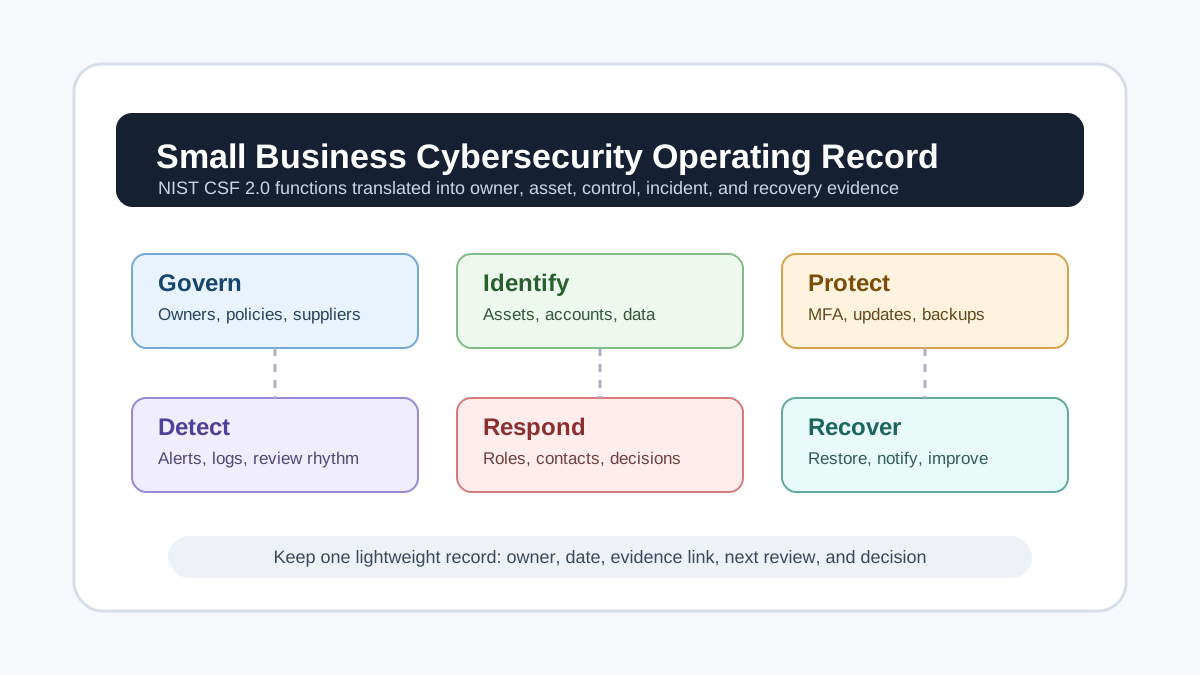
The NIST Cybersecurity Framework 2.0 is often discussed as a security framework, but for a small organization its most useful output is simpler: a maintained operating record. That record should show who owns cybersecurity decisions, which systems and data matter, which protections are in place, how incidents are detected, how the business responds, and how it gets back to work.
This reference translates the public NIST CSF 2.0 and NIST’s Small Business Quick-Start Guide into documentation a small business, nonprofit, school, clinic, studio, or local service company can actually keep current. It is designed for organizations that do not have a full security team but still need a credible way to manage cyber risk.
Record Purpose
Do not start by writing a long cybersecurity policy that nobody updates. Start with one operating record that connects risks to actions and owners. The record can live in a secured document, spreadsheet, ticketing system, governance folder, or compliance workspace, as long as it is backed up and available to the people who need it during an incident.
The operating record should answer five questions:
- What does the business depend on?
- Who is responsible for each important system, account, supplier, and decision?
- Which controls are already in place?
- What evidence shows the controls are real?
- What is the next review date or improvement action?
NIST describes the CSF as voluntary guidance for managing cybersecurity risk across organizations of any size. For small organizations, the value is not in copying every possible control. The value is in creating a practical, repeatable record that helps owners make better decisions before something breaks.
Govern
The Govern function is the starting point in CSF 2.0. It covers strategy, policy, roles, oversight, and supply chain risk. In a small business, this section should be short but explicit.
Create a governance table with the owner, backup owner, review date, and decision authority for major cybersecurity areas. Include business leadership, IT support, finance, legal or compliance contacts, payroll, customer data systems, website administration, and outside vendors that can access sensitive systems.
The table should also identify the business impact of a cyber incident. For example, a retailer may prioritize payment systems and inventory access, while a clinic may prioritize patient records, appointment systems, and communications. A consulting firm may prioritize client files, email, cloud storage, and invoicing.
The FTC’s small business cybersecurity guidance maps practical business actions to the six CSF functions. Use that structure to keep governance tied to day-to-day choices: who approves new software, who manages administrator accounts, who reviews vendors, and who can authorize emergency spending during an incident.
Identify
The Identify section should list the assets, accounts, data, and suppliers that matter. Keep it useful rather than exhaustive. A five-person company does not need an enterprise asset database, but it does need to know where its critical information lives.
At minimum, document:
- Business-critical software and cloud services
- Domain names, websites, hosting accounts, and DNS providers
- Email, file storage, messaging, payroll, accounting, and payment systems
- Devices used for business administration or customer data
- High-risk data types such as financial, health, identity, employee, student, or client information
- Vendors with administrator access, remote support access, or stored customer data
Each entry should include an owner, login method, administrator contact, recovery contact, renewal date if relevant, and the type of information stored. If an account uses a shared login, document the plan to replace it with named accounts and multifactor authentication.
The SBA’s cybersecurity page for small businesses points owners toward planning, reviews, vulnerability scanning, and supply chain risk management. Those activities are hard to perform without a basic inventory. The inventory is the evidence that the business knows what it is trying to protect.
Protect
The Protect section records the safeguards already in place and the gaps that need owners. This is where the operating record becomes more than a list of assets.
For each critical system, record whether multifactor authentication is enabled, who has administrator access, how software updates are handled, where backups are stored, whether backup restoration has been tested, and what data protection rules apply. Include endpoint protection, password manager usage, device encryption, router or firewall ownership, employee offboarding, and vendor access review.
The CISA small business cyber guidance organizes actions by role and focuses on how attacks actually happen. That is a useful discipline for small teams: assign controls to the people who can act. The owner or CEO may approve budget and risk tolerance, the IT contact may manage authentication and updates, finance may verify payment changes, and staff may need phishing reporting habits.
For documentation, avoid vague entries such as “employees trained.” Instead, record the date, topic, audience, link to material, and next refresh. Avoid entries such as “backups enabled.” Record the system backed up, backup location, frequency, restoration test date, and person responsible.
Detect
Small organizations often assume detection requires a security operations center. It does not. The practical question is whether someone would notice suspicious activity before damage spreads.
Document which alerts exist and who receives them. Important examples include bank alerts, payment processor alerts, email account security alerts, domain registrar changes, website uptime monitoring, endpoint protection alerts, cloud storage sharing notifications, and administrator login notices.
For each alert source, record the delivery channel, the primary reviewer, the backup reviewer, expected review frequency, and escalation trigger. If alerts go to a former employee, a shared mailbox nobody checks, or an outside vendor without an escalation rule, the business does not really have detection.
NIST’s quick-start material encourages small organizations to prioritize and communicate cybersecurity work. Detection records support that communication. They turn “we should watch for issues” into “these alerts are reviewed by this person on this schedule.”
Respond
The Respond section should be usable under pressure. Keep it short, current, and easy to find offline.
Document the incident roles before an incident happens. Include who can disconnect systems, contact vendors, approve emergency purchases, preserve evidence, notify customers, speak to insurers, contact law enforcement, and manage public communications. Add phone numbers and alternate email addresses because the normal email system may be compromised.
The FCC Small Biz Cyber Planner can help small businesses create a custom cybersecurity plan. Even if the business uses another template, the operating record should preserve the final response checklist and the date it was reviewed.
A basic response record should include incident date and time, reporter, affected system, immediate containment steps, people contacted, vendor tickets, customer impact, legal or regulatory questions, recovery actions, and decisions made. The record should be factual. Do not speculate about attribution or cause before evidence supports it.
Recover
Recovery is not finished when a computer turns back on. It is finished when the business has restored essential operations, confirmed data integrity, communicated as needed, and made improvements that reduce repeat risk.
Document recovery priorities before an incident. Which systems must come back first? How long can the business operate manually? Where are clean backup copies stored? Who can restore them? What proof shows the restore process was tested?
For each incident or serious near miss, add a short after-action record. Include what happened, what worked, what failed, what was restored, how long recovery took, what customers or partners were told, and what control changed afterward. The most valuable recovery record is often the improvement list: disable unused accounts, update vendor access, revise payment approval steps, test backups quarterly, or move domain administration into a better-controlled account.
Review Rhythm
Set a review schedule the business can keep. Monthly may be realistic for payment, administrator, and backup checks. Quarterly may work for vendor access, incident contacts, staff training, and asset inventory. Annual review is too slow for high-risk accounts, but it is better than no review for policies and insurance details.
Use a simple status model:
- Current: evidence reviewed and no action needed
- Needs update: owner assigned and due date set
- Accepted risk: business owner approved the risk and review date
- Retired: system, vendor, or account no longer in use
The goal is not to produce a perfect cybersecurity binder. The goal is to maintain a living record that a real owner can use before, during, and after a security problem. A small organization that knows its systems, owners, alerts, backups, vendors, and response contacts is already in a stronger position than one with a long policy and no operational evidence.